Withdraw money
Transfer your QwikPay wallet balance back to your bank account.
2 min readUpdated August 2026
Step 1: How to withdraw
- Log in to the QwikPay User App.
- Select the Withdraw option from the menu.
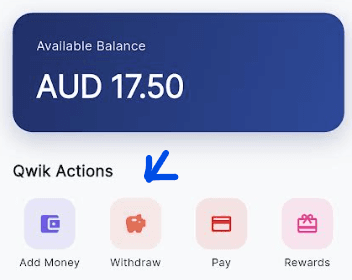
- Enter the amount you would like to withdraw.
- Submit your request.
Step 2: Important notes
Maximum withdrawal
You cannot enter a value higher than your wallet balance.
Step 3: Processing time
Business day withdrawals (before 6:00 PM):
- Funds will be settled to your nominated bank account within 3 hours.
After-hours withdrawals (6:00 PM or later):
- Your request will be processed on the next business day.
Step 4: Withdrawal requirements
Withdrawals can only be made to the bank account you used to add funds to your QwikPay wallet. This is a security measure to prevent unauthorised transfers.
Related articles
Still need help?
Our support team can help with your account.