Fill midweek and keep the card fees on every booking.

Hospitality venues take deposits, run bar tabs and live and die by midweek trade. Ask guests to download QwikPay when they book. They pay the deposit in the app and scan for meals and tastings. With QwikClub, they can also follow you for your offers.

Built for country hotels and pubs, caravan parks, wineries and cellar doors, motels and b&bs, function venues.

9:41
Inbox
YV
Your venue4:10 pm
To: Me
Your stay on 20 to 22 December

Hi Chris, thanks for booking a powered site from 20 to 22 December. To confirm, pay the $80 deposit in the QwikPay app using our email, hello@yourvenue.com.au. Download it here: qwikpay.com.au/download. Keep it handy for check-in and the bistro. You earn reward points every time, and it helps us keep 100% of what you pay. Safe travels, Your venue

Booking confirmation
$400

for a weekend stay, before meals and drinks.

Bookings, meals and bar tabs all carry card fees. Since 1 October 2026 card surcharges are banned, so those fees are yours to absorb. QwikPay charges merchants zero transaction fees.

Where QwikPay fits in your day

01

Deposits in the app

Guests open QwikPay, enter your registered email and pay the room, site or function deposit. No card numbers over the phone. A Pay Link is an option if they want one.

02

A QR at the bar or cellar door

Guests scan the board to pay for meals, tastings and bottles to take home.

03

Midweek offers

With QwikClub, post a quiet-hours offer on meals for the nights you want busier. Guests who follow you see it.

In the app

No card details, no terminal, nothing added at checkout.

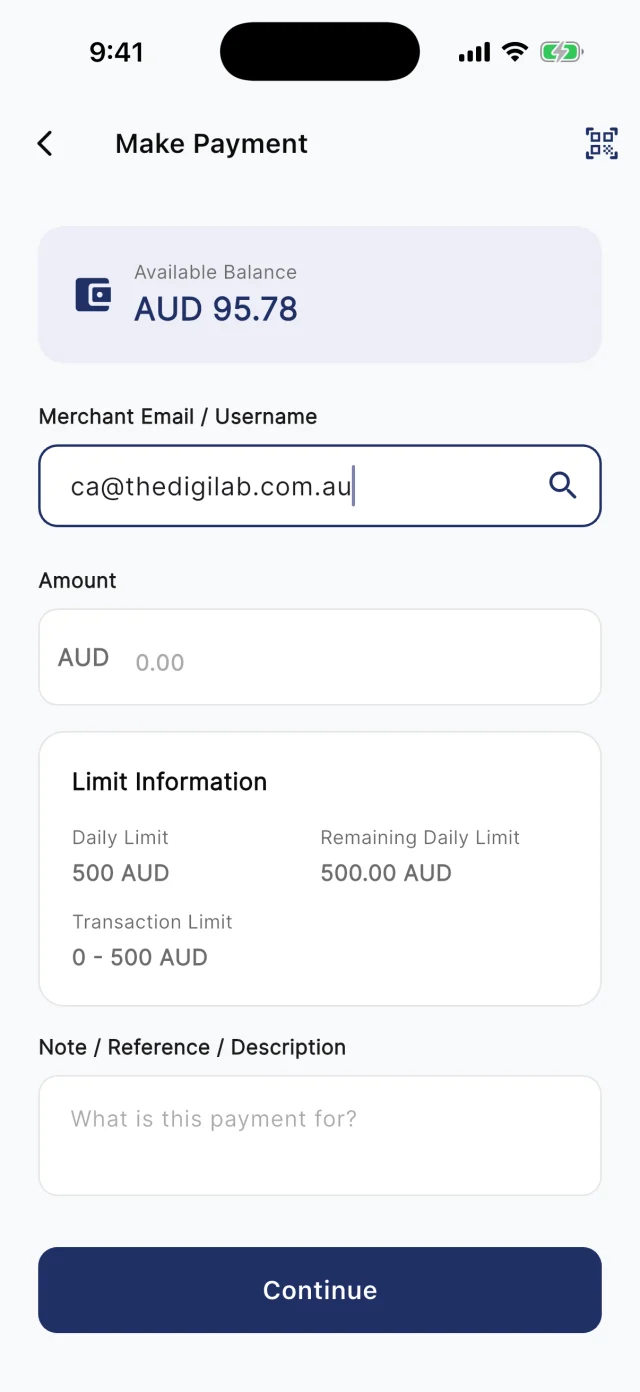
At the counter, customers scan your board. Away from it, they type your registered email into Make Payment. Either way they check the amount and pay from their QwikPay wallet, and every payment earns them points.

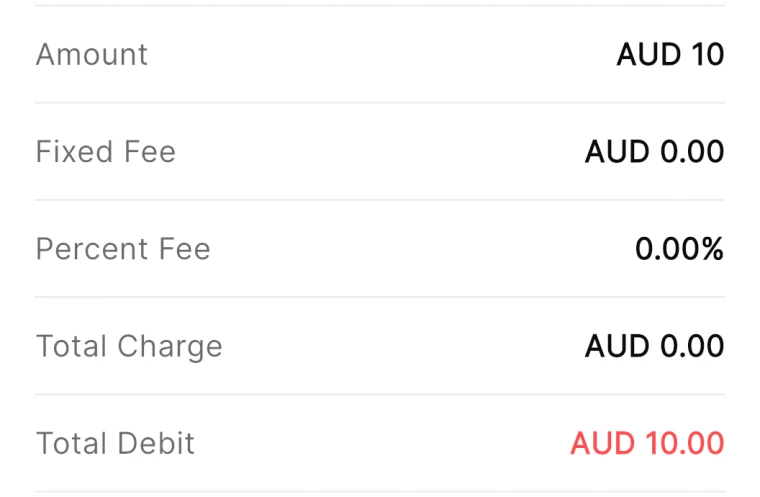
QwikPay review screen showing a fixed fee of AUD 0.00 and a percent fee of 0.00%
The review screen before every payment
QwikPay Make Payment screen with a merchant email entered
Paying by the business's email
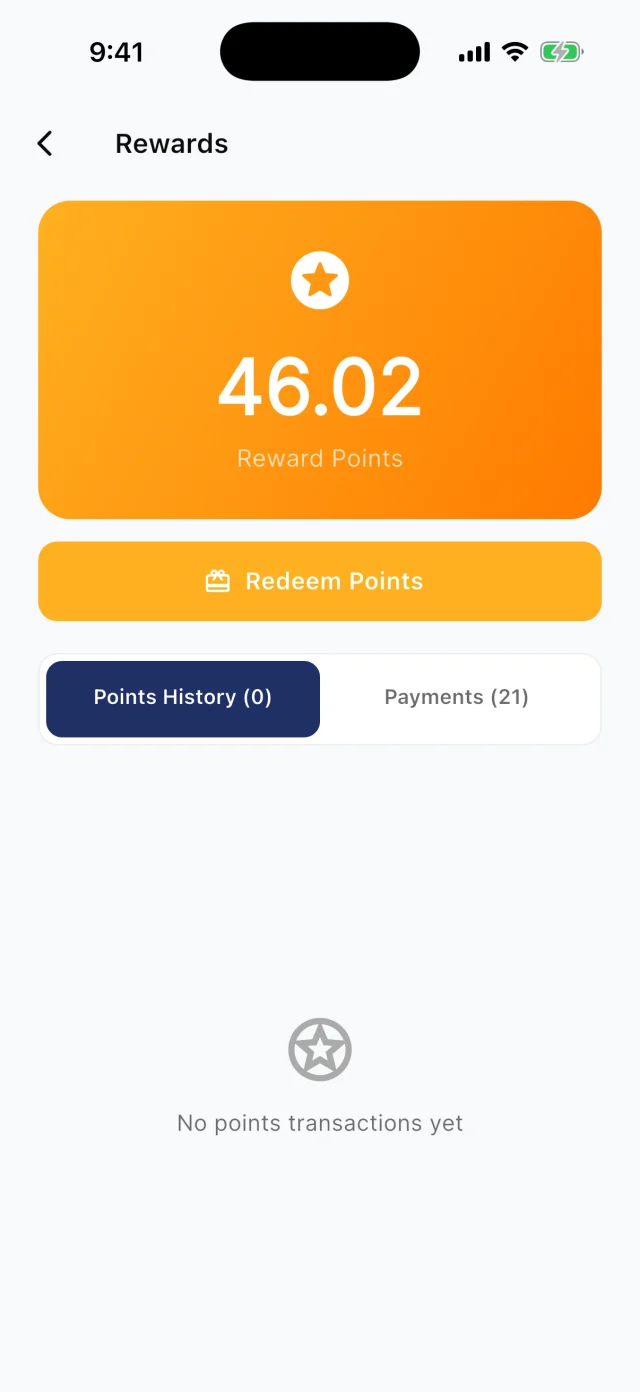
QwikPay Rewards screen showing a reward points balance
Points from every payment

Your first customers

They already buy from you. Start there.

You do not need new customers to get started. Ask the ones you have to download QwikPay and have it ready for their next visit. They earn points, they can follow you for offers, and you keep 100% of what they pay.

Booking confirmation · Email

Your stay on 20 to 22 December

Hi Chris, thanks for booking a powered site from 20 to 22 December. To confirm, pay the $80 deposit in the QwikPay app using our email, [your QwikPay email]. Download it here: qwikpay.com.au/download. Keep it handy for check-in and the bistro. You earn reward points every time, and it helps us keep 100% of what you pay. Safe travels, [your business]

Swap in your registered QwikPay email before you send it.
  1. 1

    Ask locals at the bar

    Your regulars are there every week. A quick word from the bar staff about earning points starts it.

  2. 2

    Put it in booking confirmations

    Every booking confirmation asks guests to download QwikPay and pay the deposit using your email.

  3. 3

    Board at check-in

    Guests checking in have their phone out already. Put the board at reception.

  4. 4

    Tell travellers on your socials

    Post your board at the cellar door or bar in your stories.

A normal week

Two ways it plays out at a venue

Caravan park site deposits

A caravan park takes holiday bookings months ahead by phone.

  1. The confirmation asks the guest to download QwikPay
  2. They pay the deposit in the app using your email
  3. The balance is a scan at check-in

What changes

No card numbers over the phone, and guests arrive with the app ready for the kiosk and bistro.

Coming with QwikClub

Midweek dinner trade

A country hotel bistro is quiet Monday to Wednesday.

  1. Post a quiet-hours offer on meals for those nights
  2. Followers and nearby travellers see it in the app
  3. They pay with QwikPay and the discount applies

What changes

More covers on slow nights without touching the weekend menu price.

Rewards and offers

The first payment is easy. The next visit is the point.

Every QwikPay payment earns your customer 1 Qwik Point per $1, which they turn into wallet credit at QwikPay businesses.

With QwikClub, customers with the app can follow your business. You choose an offer's discount, hours and how many people can use it, and your followers and nearby customers see it in the app.

Offers are coming with QwikClub

Your venueQuiet hours
15%off

Bistro meals Monday to Wednesday

Applied when you payQwikPay

Midweek meals

Discount meals only on the nights you want busier.

Your venueSelected items
20%off

The 2024 shiraz this month

Applied when you payQwikPay

Cellar door specials

Push selected bottles or a tasting flight.

Your venueWhole bill
10%off

Your next stay booked this month

Applied when you payQwikPay

Return visit

A whole-bill offer for followers who stayed last season.

Card surcharges are banned, but a clearly disclosed discount for paying with QwikPay is allowed. Keep the terms of each offer clear.

Questions we get asked

How do guests pay a deposit?

They open the QwikPay app, enter your registered email and pay. You can send a Pay Link instead if they prefer.

Can I run offers on drinks?

Check your state's liquor licensing rules before discounting alcohol. Offers on meals, rooms and tastings are usually simpler.

What does it cost?

Zero transaction fees. You keep 100% of each QwikPay payment.

Start with the customers you already have.

Apply online. Once you are approved, your QR kit arrives and your regulars can pay you through QwikPay.

Fees
Zero transaction fees
At the counter
QR board and poster
Remote payments
In the app with your email
Manage it
Merchant App and Portal